Gaming Hand Fatigue: Why It Happens and How Proper Hand Training Helps
Whether you’re grinding ranked matches, competing in tournaments or enjoying a long weekend gaming session, hand fatigue can quickly become one of the biggest obstacles to consistent performance.
Many gamers experience symptoms such as reduced control, slower reactions, thumb fatigue and a noticeable decline in accuracy as sessions become longer. While players often blame focus, sensitivity settings or even poor gameplay, the underlying issue is frequently physical fatigue within the hands themselves.
The good news is that hand fatigue isn’t simply something gamers have to accept.
Understanding why it happens and how proper training can help is an important step toward maintaining performance during longer gaming sessions.
Understanding Gaming Hand Fatigue
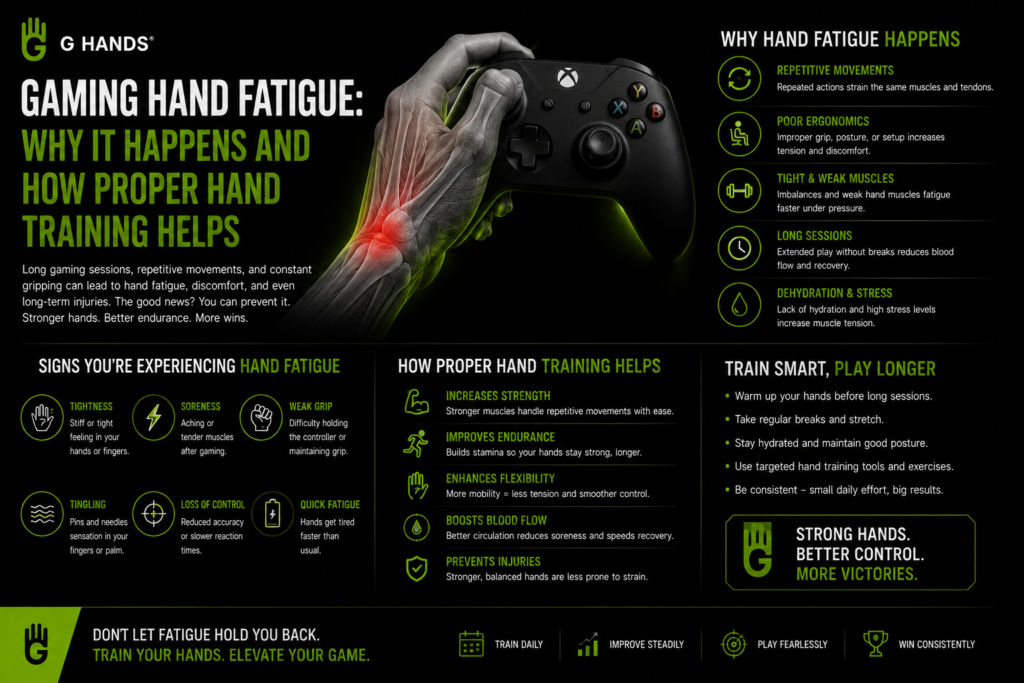
Gaming hand fatigue occurs when the muscles responsible for controlling the controller become overworked during repetitive movements.
Gaming requires thousands of small actions:
- Thumbstick movements
- Trigger pulls
- Button presses
- Grip stabilization
- Continuous hand positioning
Over time, these repeated actions place stress on the muscles that support control and coordination.
This can lead to:
- Reduced responsiveness
- Decreased accuracy
- Slower reaction times
- Loss of hand stability
- Increased hand discomfort
While fatigue affects all gamers to some degree, competitive players often notice its impact more because precision becomes increasingly important during high pressure situations.
Why Long Gaming Session Pain Happens
Many players experience long gaming session pain without fully understanding the cause.
One of the biggest factors is muscle endurance.
Most gamers regularly practice gameplay mechanics, but very few train the muscles responsible for maintaining control.
Imagine trying to run a marathon without ever conditioning your legs.
The same concept applies to gaming.
When hand muscles are not properly conditioned, they fatigue faster under repetitive demands.
As endurance decreases, players often experience:
- Hand tension
- Reduced control
- Thumb fatigue
- Difficulty maintaining precision
This is especially noticeable in competitive games that require constant thumbstick adjustments and rapid inputs.
Thumb Fatigue and Controller Performance
Thumb fatigue is one of the most common complaints among controller players.
The thumb performs an enormous amount of work during gameplay.
It controls:
- Aim adjustments
- Camera movement
- Navigation
- Tracking targets
- Fine positioning
However, the thumb does not work alone.
Every thumb movement depends on support from surrounding muscles throughout the hand.
When stabilizing muscles become fatigued, the thumb is forced to compensate.
This often leads to:
- Reduced accuracy
- Overcorrection
- Less consistent movement
- Increased effort during gameplay
The result is a noticeable decline in performance as sessions continue.
The Hidden Role of the Ring Finger and Pinky
One of the most overlooked contributors to hand fatigue involves the ring finger and pinky.
Most players focus entirely on their thumbs.
Yet research into hand biomechanics shows that the ring finger and pinky contribute significantly to overall hand stability and grip strength.
These muscles help:
- Stabilize controller positioning
- Support thumb movement
- Maintain grip consistency
- Improve fine motor control
Unfortunately, these muscles are often undertrained.
Your pinky isn’t weak.
It’s simply underused and undertrained.
When these stabilizers fatigue, the entire hand becomes less efficient, forcing larger muscles to work harder.
This accelerates fatigue and reduces performance.
Gaming Hand Exerciser for Better Endurance
A Gaming Hand Exerciser can help improve endurance by strengthening the muscles used during gameplay.
Rather than focusing solely on grip strength, gaming specific training emphasizes:
- Stability
- Coordination
- Controlled movement
- Endurance development
This helps create a stronger foundation for long gaming sessions.
When hand muscles become better conditioned, players may find it easier to maintain control and consistency throughout gameplay.
The goal isn’t simply stronger hands.
The goal is more sustainable performance.
Why a Finger Strength Trainer Supports Gaming Performance
A Finger Strength Trainer helps develop the smaller muscles responsible for stabilizing hand movements.
These muscles are essential for:
- Precision
- Consistency
- Endurance
- Coordination
Strengthening them can improve how efficiently the hand handles repetitive gaming demands.
As a result, players may experience:
- Better control during long sessions
- Improved grip stability
- Reduced performance decline
- More consistent gameplay
This type of training supports the physical demands of gaming in a way that traditional gameplay practice cannot.
Gaming Warmup Tool: Preparing Hands Before Play
Professional athletes rarely begin competition without warming up.
Gamers can benefit from a similar approach.
Using a Gaming Warmup Tool before a session helps prepare the muscles and nervous system for gameplay.
Benefits of warming up may include:
- Increased hand responsiveness
- Improved movement control
- Better flexibility
- Enhanced coordination
A proper warmup routine helps activate muscles before they become heavily involved during gameplay.
This can contribute to more consistent performance from the beginning of a session.
Hand Mobility Trainer and Movement Efficiency
Mobility is often overlooked in gaming performance discussions.
However, efficient movement requires both strength and mobility.
A Hand Mobility Trainer helps maintain healthy movement patterns by encouraging controlled motion throughout the hand and fingers.
Improved mobility can support:
- Smoother controller inputs
- Better movement efficiency
- Reduced stiffness
- More comfortable gameplay
Combined with strength and coordination training, mobility helps create a more complete performance system.
Gaming Coordination Trainer and Neuromuscular Control
Gaming performance depends heavily on neuromuscular control.
This refers to the communication between the brain and muscles.
A Gaming Coordination Trainer helps improve these connections through controlled movement exercises.
Better neuromuscular control can support:
- Faster movement execution
- More accurate inputs
- Improved consistency
- Better hand awareness
This is particularly important when fatigue begins to set in.
Players with stronger coordination often maintain performance more effectively during extended gaming sessions.
Prevent Hand Fatigue Gaming Through Consistent Training
While no training can completely eliminate fatigue, conditioning the hands can help players better manage the physical demands of gaming.
A consistent routine that includes:
- Strength training
- Dexterity development
- Warmups
- Mobility work
- Coordination exercises
can support long term hand performance.
Much like athletes train their bodies for competition, gamers can train their hands to perform more efficiently under pressure.
The Difference Between Strength and Control
Many traditional grip tools focus on force.
Gaming requires control.
The best training approach combines:
- Strength
- Stability
- Dexterity
- Coordination
- Endurance
Because gaming isn’t about squeezing harder.
It’s about controlling movement more effectively.
A Gaming Hand Exerciser designed around controller specific movement patterns helps players train for actual gameplay rather than generic hand strength.
Performance Meets Purpose
GHands was created to help gamers build stronger, more coordinated and more resilient hands through gaming specific training.
By focusing on stabilizing muscles, neuromuscular control and controller based movement patterns, GHands offers a unique approach to performance development.
Beyond gaming, every GHands color supports a meaningful cause.
Each purchase contributes to positive impact while helping players invest in their own performance journey.
Every rep strengthens your hands.
Every purchase strengthens a cause.
Because better gaming performance should create a difference both on and off the screen.